
Quick answer
To get more Google reviews, ask every customer soon after a genuine visit or purchase and send your review link or QR code (in your Business Profile, Read reviews, then Get more reviews). Reply to each review briefly and politely, without offers or private details. Google’s policy forbids offering anything in exchange for a review, discouraging negative reviews, asking only happy customers (review gating), and reviews from staff, family or competitors. Breaking it can get reviews removed, new reviews blocked or a warning shown on your profile.
Key takeaways
- Google says more reviews and positive ratings can help a business’s local ranking.
- Ask every customer for an honest review, never only the happy ones.
- No discounts, gifts or payment for a review, or for changing or removing one.
- Replies are public and checked by Google: keep them short, polite and free of offers.
- A review is only removed if it breaks Google’s policy; disagreeing with it is not enough.
For a restaurant, a dental clinic or a hardware shop, the star rating beside the name on Google Maps is often the first thing a new customer sees. Reviews are also one of the few local signals a business can work on every single week.
Our Google Business Profile optimisation guide covers setting up the profile itself. This guide is about reviews alone: how to ask for them, how to reply, and exactly where Google draws the line. It is the same review routine we run inside our local SEO service.
Why do Google reviews matter for a business?
Google’s local ranking help page names three local ranking factors: relevance, distance and prominence. It says prominence is based partly on how many reviews you have, and that more reviews and positive ratings can help a business’s local ranking.
Ranking is only half of it. Someone comparing three dental clinics on the map reads the ratings, the newest reviews and whether the owner replied. Google’s own tips page makes a point that surprises many owners: a mix of positive and negative feedback often feels more trustworthy than a wall of five stars.
In our work with local businesses, the usual problem is not bad reviews. It is very few reviews, most of them old, with no replies. That is fixed with a habit, not a one-off campaign.
How to get more Google reviews the right way
Start with your own review link. Google’s help page on how to create a review link or QR code explains where it is: open your Business Profile, choose Read reviews, then Get more reviews. You can copy the link there. The QR code can currently only be created from a computer browser, not a phone.
- Ask at the natural moment. Right after the service is done: the bill is paid, the order is delivered, the patient has checked out, the student’s visa has come through.
- Use the channels your customers already use. Send the link by WhatsApp, Viber, SMS or with the emailed receipt. Google itself suggests receipts, thank-you emails, the end of a chat and a printed display in the shop.
- Put the QR code where people wait. The billing counter, a table card in a café, the clinic waiting area or the delivery packet.
- Keep the message short. One line in your customers’ language is enough, for example: “Thank you for visiting. If you have a minute, please share your honest experience on Google: [link]”. Say “honest”, never “five-star”.
- Help customers without a Google account. Reviewers must be signed in to a Google Account, and Google notes that one can be set up with a non-Gmail email address.
- Ask everyone. Make the request part of every checkout, not something staff do only when a customer looks pleased. That is fairer, and as the next section shows, it is also what the policy requires.
Expect a steady trickle rather than a jump. In our experience, a few genuine reviews every month keeps your newest reviews recent and reads far more naturally than fifty arriving in one week.
What does Google's review policy forbid?
Every review on Maps falls under Google’s prohibited and restricted content policy. Its fake engagement section says contributions must reflect a genuine experience. For a business owner, these are the rules that matter most:
- No incentives. You cannot offer payment, discounts, free goods or services in exchange for a review. A free coffee, a discount on the next visit, a mobile recharge or entry into a lucky draw all count.
- No paying to change or remove a review. Google’s help pages say offering anything to get a negative review edited or deleted is prohibited too.
- No review gating. You may not discourage or prohibit negative reviews, or selectively ask only the customers you expect to be happy. A “rate us first” survey that sends only four- and five-star customers on to Google is exactly this.
- No scripted reviews. The policy specifically lists merchants asking staff to collect reviews that include specific content.
- No conflicts of interest. Reviews from owners, current or former employees, contractors or family are not allowed, and neither is posting on a competitor’s listing to damage its reputation.
- No bought or swapped reviews. Reviews bought from a seller or traded in a Facebook group do not describe a genuine experience, so they fall outside the policy.
What happens if a business breaks these rules? Google removes the fake reviews and, according to its page on Business Profile restrictions for policy violations, can also stop the profile receiving new reviews for a set period, unpublish its existing reviews, or show customers a warning that fake reviews were removed. Google says it emails the owner before applying a restriction, and the owner can appeal.
We do not buy reviews, run review swaps or build gated review funnels for any client. A warning banner on a clinic’s profile costs far more than slow, honest growth.
Google reviews: allowed or not?
| Practice | Allowed? | Why |
|---|---|---|
| Asking every customer for an honest review | Yes | Google encourages asking for genuine reviews |
| Review link on receipts or a QR code at the counter | Yes | Google lists these as places to share your link |
| Replying to every review | Yes | Google recommends short, personal replies |
| A discount, gift or lucky-draw entry for a review | No | An incentive counts as fake engagement |
| Sending only happy customers to Google | No | Selective solicitation, also called review gating |
| Staff, family or friends posting reviews | No | Conflict of interest |
| A refund if the customer deletes a bad review | No | An incentive to remove a negative review |
How to respond to Google reviews, good and bad
Only a verified owner or manager can reply. Google’s page on how to manage customer reviews explains that replies show under the review in the business’s name and that the reviewer is notified. Each reply is checked against Google’s content policies first, which usually takes minutes but can take up to 30 days, and you can edit or delete it later.
Google’s tips to get more reviews also set out how to reply. Combined with our own practice, that gives these rules:
- Keep it short, polite and personal. Use the reviewer’s name and sign off with your name or initials.
- Do not paste the same thank-you under every review. Say something specific.
- Do not use replies to advertise deals or promotions.
- Protect privacy. This matters most for clinics, schools and law firms: never confirm that someone was a patient or mention their case, even when answering criticism.
- For a negative review, thank the reviewer, acknowledge the problem without blaming them, apologise where it is fair and offer a phone number or email to sort it out privately.
- Reply in the language the reviewer used.
Positive review, example reply: “Thank you, Priya. We are glad the family dinner went well and hope to see you again soon. Tom, Manager”
Negative review, example reply: “Hi Daniel, we are sorry about the long wait on Saturday. That is not the service we aim for. Please call us on [number] so we can understand what happened and put it right. Anita, Owner”
A customer can change their review after reading your reply, and the review date updates when they do. A fair, calm answer to a fair complaint sometimes turns one star into four. Just never offer anything in return for the change.
Education consultancies face their own review moments, such as visa outcomes; our guide to reviews and social proof for consultancies covers those.
Can you remove a bad or fake Google review?
Only reviews that break Google’s policies are eligible for removal, and the way to get there is to report them. Google’s guide to report inappropriate reviews describes the steps:
- Flag the review from your profile (Read reviews, then the report option beside it) or through the Reviews Management Tool, and pick the reason that fits.
- Track it in the Reviews Management Tool. Google says evaluation typically takes several days.
- If Google finds no violation, you can appeal once, choosing up to 10 reviews per appeal. The decision comes by email.
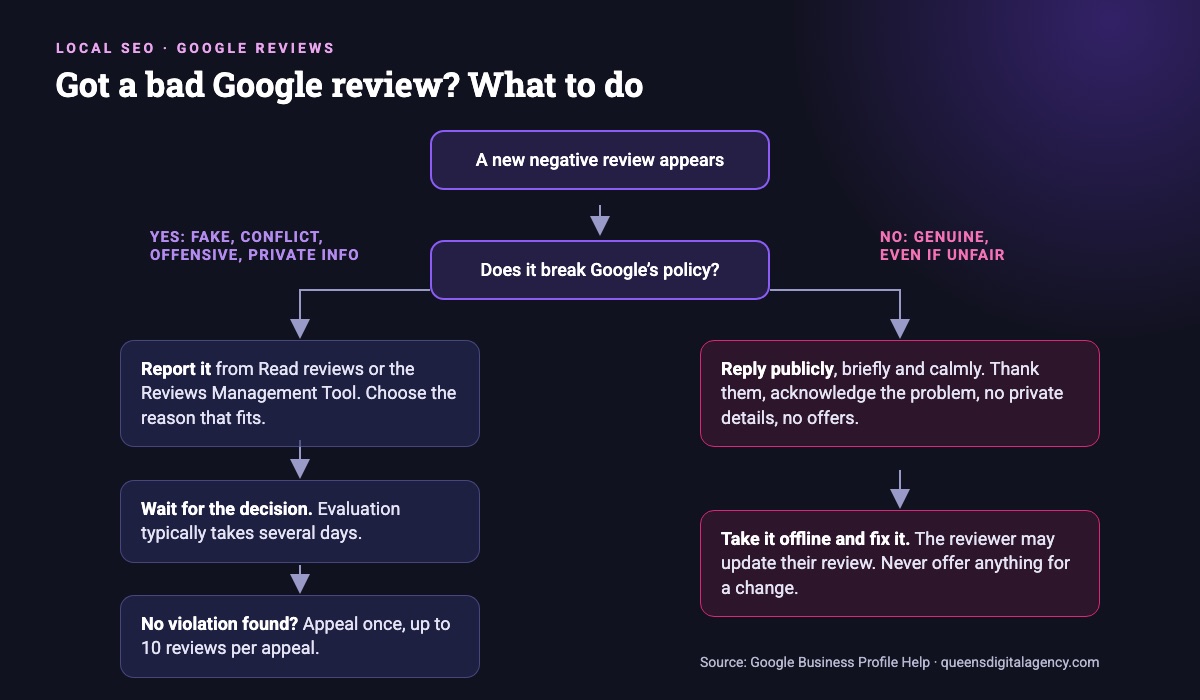
Google is clear that you should not report a review just because you disagree with it, and that it does not take sides in disputes between businesses and customers. An unfair but genuine one-star review stays up; your reply is your answer to it. The reviews worth reporting are the ones from people who were never customers, from a competitor or ex-employee, or that contain offensive language or someone’s private details.
If someone threatens to post negative reviews unless you pay them, Google’s reporting page links to a separate route for extortion scams. Use that rather than paying.
A simple weekly review routine
This is the routine we set up for local clients. It fits a busy owner or one staff member:
- Every day: send the review link with each completed order, bill or appointment.
- Twice a week: reply to every new review.
- Every week: flag any review that clearly breaks the policy, and pass recurring complaints to whoever can fix them.
- Every month: compare your review count, rating and how recent your reviews are with your two nearest competitors, and check calls and direction requests in the profile’s Performance view.
Running several branches? Each location has its own profile and its own reviews, so give every branch its own link and QR code. Our guide to SEO for businesses with several branches explains how to manage the rest.
Reviews work best on a complete, accurate profile. In our Clean Air Nepal case study, keeping the showroom listing complete and building local citations was part of making the store easy to find and visit for nearby buyers, alongside ecommerce SEO, social media and AI-visibility work.
Queens Digital, a Nepal-based SEO and AI/GEO agency, sets up and runs this routine for local businesses as part of local SEO.
Want a second opinion on your site? Ask us for a free SEO review and we will tell you what to fix first, in plain language.
Explore More
Reviewed by
K.K. Bhatta
K.K. Bhatta is a general digital marketer at Queens Digital Agency: hands-on across SEO, paid media, and whatever platform changes next. A lifelong learner rather than a one-topic specialist, he tests ideas on live campaigns before writing about them, and stays skeptical of anything that has not actually been tried.
Every claim in this article was checked against a live source before publishing.
No. Google’s policy forbids offering payment, discounts, free goods or services in exchange for a review, and also for changing or removing a negative one. Ask for an honest review and offer nothing in return.
No. Google does not allow businesses to discourage negative reviews or to selectively ask only happy customers. Sending a survey first and passing only high scorers on to Google is gating. Send the same request to everyone.
Reply calmly and briefly, thank the reviewer, acknowledge the problem, apologise where it is fair and offer a phone number or email to resolve it privately. Never share private details or argue in public.
You can report it from your profile or the Reviews Management Tool. Google removes reviews that break its policies; if it finds no violation, you can appeal once. Reviews are not removed just because you disagree with them.
Usually not. Google’s review snippet guidelines say that when a business controls the reviews about itself, its pages using LocalBusiness or Organization markup are not eligible for review stars, and that you should not aggregate reviews from other websites.
Sources and references
Facts in this guide come from the sources below, checked live on 8 November 2026. Everything else is our own working practice, stated as such.
- Google Maps User Contributed Content Policy, Prohibited and restricted content
- Google Business Profile Help, Tips to get more reviews
- Google Business Profile Help, Create a Google link or QR code to request reviews
- Google Business Profile Help, Manage customer reviews
- Google Business Profile Help, Report inappropriate reviews on your Business Profile
- Google Business Profile Help, Business Profile restrictions for policy violations
- Google Business Profile Help, Tips to improve your local ranking
- Google Search Central, Review snippet structured data