Quick answer
“Discovered – currently not indexed” means Google found the URL but has not crawled it yet, usually because of server load or low priority. “Crawled – currently not indexed” means Google fetched the page and chose not to index it for now, often because it adds little new, looks like a duplicate or has few internal links. Neither is a penalty. Check important pages in URL Inspection, fix duplicates, add links from related indexed pages, improve the content, then request indexing once.
Key takeaways
- “Discovered” means not crawled yet; “Crawled” means fetched but not indexed.
- Google does not index every URL, so fix only pages you need in search.
- URL Inspection shows the canonical, rendered HTML and crawl status in one place.
- Internal links from related, indexed pages are often the quickest fix.
- Request indexing once after a real change; repeat requests do not speed it up.
You publish a page, wait, and Search Console tells you it is “Crawled – currently not indexed” or “Discovered – currently not indexed”. The page exists, Google knows about it, and it still does not appear in search. This guide explains what each status means, why Google is not indexing your page, and the order we work through to fix it.
Indexing problems are one of the first things we look at in our technical SEO service, and we have had to fix them on our own site too.
What does crawled currently not indexed mean?
The two statuses sit in the Page indexing report in Search Console, under “Why pages aren’t indexed”. They describe two different points in the same journey.
- Discovered – currently not indexed: Google has found the URL, usually through a link or a sitemap, but has not crawled it yet. Google’s Page indexing report help says this usually happens because crawling was expected to overload the site, so the crawl was rescheduled.
- Crawled – currently not indexed: Google has fetched the page and decided, for now, not to add it to the index. Google notes that it does not index every page on the web, so this is a common message for many sites.
Neither status is a penalty, and neither is an error in the usual sense. Google’s own How Search works guide states that it does not guarantee to crawl, index or serve any page, and that indexing depends on the content of the page and its metadata. The question is whether the page is one you actually need in search.
Discovered vs crawled, currently not indexed
| Discovered – currently not indexed | Crawled – currently not indexed | |
|---|---|---|
| What Google has done | Found the URL, not fetched it | Fetched the page, chose not to index it |
| Usual causes | Slow server, too many low-value URLs, few links | Thin or duplicate content, weak internal links, rendering gaps, too new |
| Improve the content? | Will not help yet | Often the main fix |
| First things to check | Crawl stats, sitemap, internal links | URL Inspection: canonical, rendered HTML, noindex |
| Request indexing? | After fixing access or links | After a real change, once |
Should you worry about every page in the report?
No. Google says plainly that you should not expect every URL on your site to be indexed. Before fixing anything, sort the list:
- Ignore: tag archives, author pages, internal search results, feed URLs, paginated archives and parameter URLs. Often these should not be indexed anyway.
- Look again: old blog posts with little traffic. Some deserve improving; many are better merged or removed.
- Fix now: service pages, location pages, product and category pages, case studies and guides you want people to find.
Open each “fix now” URL in the URL Inspection tool. It shows when Google last crawled the page, whether crawling was allowed, which canonical Google chose and how the rendered page looks. That one screen often explains the problem.
Why is Google not indexing your page?
When an important page is crawled but not indexed, it is usually one of these reasons, roughly in the order we find them:
- The page adds little that is new. Short, generic or near-identical pages give Google little reason to store another copy. Google’s guidance on helpful, people-first content is the standard to measure against.
- It looks like a duplicate. Several URLs with the same content split the signal, and Google picks one canonical. Our guide to canonical, noindex and robots.txt explains how to send one clear signal.
- Few or no internal links point to it. A page that only appears in the sitemap looks unimportant. Google discovers pages mainly by following links from pages it already knows.
- The content only appears after JavaScript runs. If the rendered HTML in URL Inspection is missing the main text or links, Google may judge the page empty. See our piece on links that crawlers cannot follow.
- The page is new. Sometimes Google simply has not decided yet. Give a new page a few weeks before you change it.
“Discovered” has different causes: a slow or overloaded server, very large numbers of low-value URLs competing for crawling, or a new page with no links to it yet.
How to fix crawled currently not indexed, step by step
This is the order we use, because it starts with the checks that take minutes and leaves rewriting until we know it is needed.
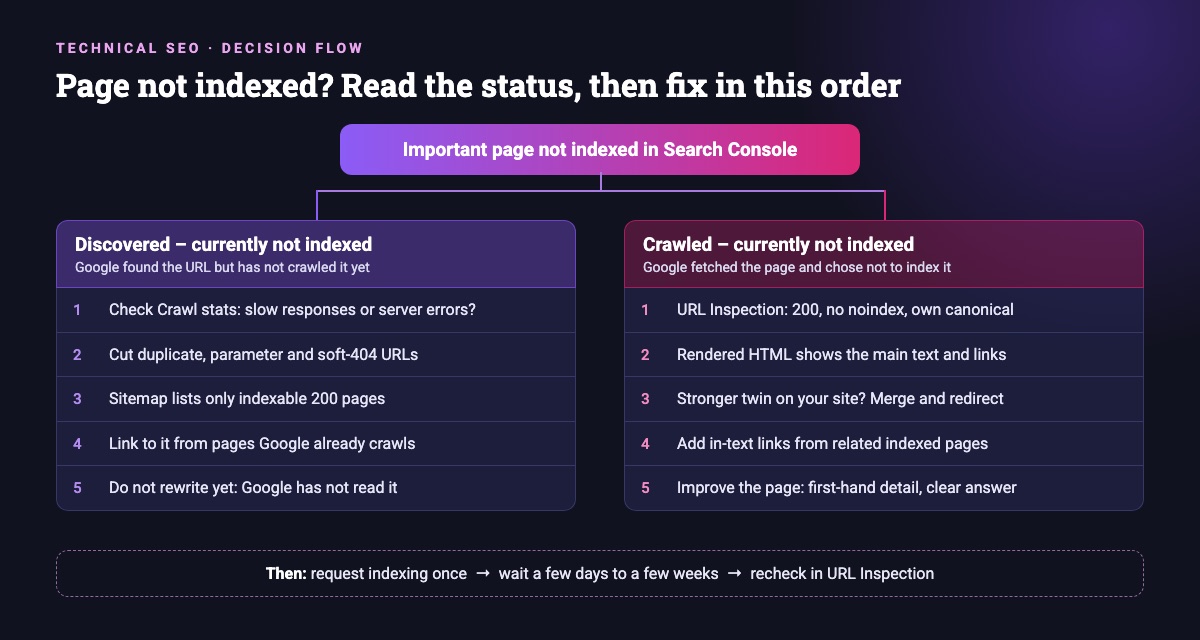
- Confirm the basics in URL Inspection. Status 200, no
noindex, not blocked by robots.txt, and Google’s chosen canonical is the page itself. - Check the rendered HTML. The main content, headings and links should be there without user interaction.
- Look for a stronger twin. If another page on your site covers the same topic, merge the two and redirect the weaker one. Our guide to cleaning up overlapping blog posts walks through it.
- Add internal links from relevant, indexed pages. Use short, descriptive anchor text, placed in the body copy next to the passage they support, not only in menus or footers. Google’s link best practices cover what makes a link crawlable.
- Improve the page itself. Answer the question better than the pages that rank: first-hand detail, clear structure, real examples, a clear purpose.
- Request indexing once. Use “Request indexing” in URL Inspection after a real change, then wait.
How to fix discovered currently not indexed
Because Google has not fetched the page yet, rewriting it changes nothing. Work on access and priority instead:
- Server health. Google’s crawl budget guide explains that when a site responds slowly or returns server errors, Google crawls less. In our audits, slow budget hosting is a common cause, so check Settings > Crawl stats in Search Console.
- Fewer junk URLs. Duplicate, parameter and soft-404 URLs use up crawling that your real pages need. The same guide advises removing duplicate content so crawling focuses on unique pages.
- A clean sitemap. List only indexable, canonical pages that return 200, as Google’s sitemap overview describes.
- Links from pages Google already crawls. A link from a well-visited page is usually the quickest way to move a URL up the queue.
The crawl budget guide is written for large sites (Google mentions 1 million+ pages, or 10,000+ pages that change daily). For a typical small business site, “Discovered” is more often a links or server problem than a budget problem.
What we did when two of our own pages were not indexed
We recently had the same problem on this site. Two pages Google knew about were not indexed: our Aarambha College case study and one of our insight articles. Both pages were complete, returned 200, had no noindex and used a self-referencing canonical. What they lacked was editorial links: almost nothing in the body copy of our other pages pointed to them.
So we fixed the links before touching the content. We added in-text links to each one from closely related pages that Google already indexed, such as our education guides and service pages for the case study, and our related AI and Search Console articles for the insight. Each anchor described the page it pointed to. Only then is a single indexing request worth making.
At Queens Digital, a Nepal-based SEO and AI/GEO agency, this is our standing practice for clients worldwide: when a good page is crawled but not indexed, check the links into it before anything else. It is cheap, it helps visitors find the page, and it tells Google the page matters to the rest of the site.
How long does it take?
Google says recrawling can take anywhere from a few days to a few weeks, and that requesting a crawl does not guarantee inclusion. It also notes there is a quota for individual URL requests and that repeat requests do not speed things up (see Ask Google to recrawl your URLs). If you fixed an issue across many pages, use “Validate fix” in the Page indexing report instead; Google says validation typically takes up to about two weeks.
Want a second opinion on your site? Ask us for a free SEO review and we will tell you what to fix first, in plain language.
Explore More
Reviewed by
K.K. Bhatta
K.K. Bhatta is a general digital marketer at Queens Digital Agency: hands-on across SEO, paid media, and whatever platform changes next. A lifelong learner rather than a one-topic specialist, he tests ideas on live campaigns before writing about them, and stays skeptical of anything that has not actually been tried.
Every claim in this article was checked against a live source before publishing.
Discovered means Google knows the URL but has not fetched it yet. Crawled means Google fetched the page and decided not to index it for now. The first is about access and priority; the second is usually about the page itself and its links.
Not in itself. Google does not index every URL. It only matters for pages you want people to find, such as service, product, location and guide pages.
No. Google says repeat requests for the same URL do not get it crawled faster and there is a quota. Make a real change, request once, then wait a few weeks.
New sites often have few links pointing to them. Submit a sitemap, link every important page from your menu or body copy, make sure nothing is set to noindex, and give Google a few weeks.
Sources and references
Facts in this guide come from the sources below, checked live on 8 November 2026. Everything else is our own working practice, stated as such.
- Search Console Help, Page indexing report
- Search Console Help, URL Inspection tool
- Google Search Central, In-depth guide to how Google Search works
- Google Search Central, Ask Google to recrawl your URLs
- Google Search Central, Crawl budget management for large sites
- Google Search Central, Link best practices
- Google Search Central, What is a sitemap
- Google Search Central, Creating helpful, reliable, people-first content