
Quick answer
A content refresh updates a blog post that is worth keeping, on the same URL, so it is accurate and useful again. Pick candidates from Search Console: pages losing clicks, pages with impressions but few clicks, and posts with outdated facts. Check every fact, re-read the search intent, answer new queries, improve the title, and update internal links. Change the visible date only for a real update, request a recrawl once, then compare equal periods before and after.
Key takeaways
- Refresh pages worth keeping; merge overlapping posts instead.
- Choose candidates from Search Console data, not from the publish date.
- Change what readers notice: facts, sources, intent, answers and titles.
- Keep the URL and change the date only after a substantial update.
- Measure equal periods before and after, and allow for seasonality.
Most business blogs have a back catalogue: posts written two or three years ago about fees, visa rules, prices, tools or “trends for” a year that has already passed. Some of those posts still bring in visitors and enquiries. Others are slowly losing clicks because the facts are stale or a competitor now answers the question better.
A content refresh means updating a page that is worth keeping, on the same URL, so it is accurate and useful again. This guide covers when to update old blog posts, what to change, and how to measure whether the update worked. It is the routine maintenance side of our content SEO work.
Refresh, rewrite, merge or remove: which does this post need?
Before you touch a post, decide what kind of job it is. A refresh is not the answer for every old page.
- Refresh when the post still targets the right question and has some search visibility, but parts are out of date or thin.
- Rewrite when the topic is still right but the post no longer matches what searchers want, for example a short news-style post on a question that now needs a step-by-step guide.
- Merge when two or more posts cover the same topic and compete with each other. That is a different job, with redirects, and our guide to merging overlapping blog posts explains it.
- Remove when a post has no audience, no links and no value to the business, and nothing to merge it into.
This guide is about the first two: pages you keep, on the URL they already have.
Refresh, rewrite, merge or remove: choosing the right job
| Option | When it fits | What happens to the URL |
|---|---|---|
| Refresh | Right topic, some visibility, parts out of date | Same URL, update the date |
| Rewrite | Right topic, wrong format or intent | Same URL, update the date |
| Merge | Several posts on the same topic | Keep one URL, 301 the others |
| Remove | No audience, links or business value | Remove; redirect only to a genuinely related page |
When is an old blog post worth updating?
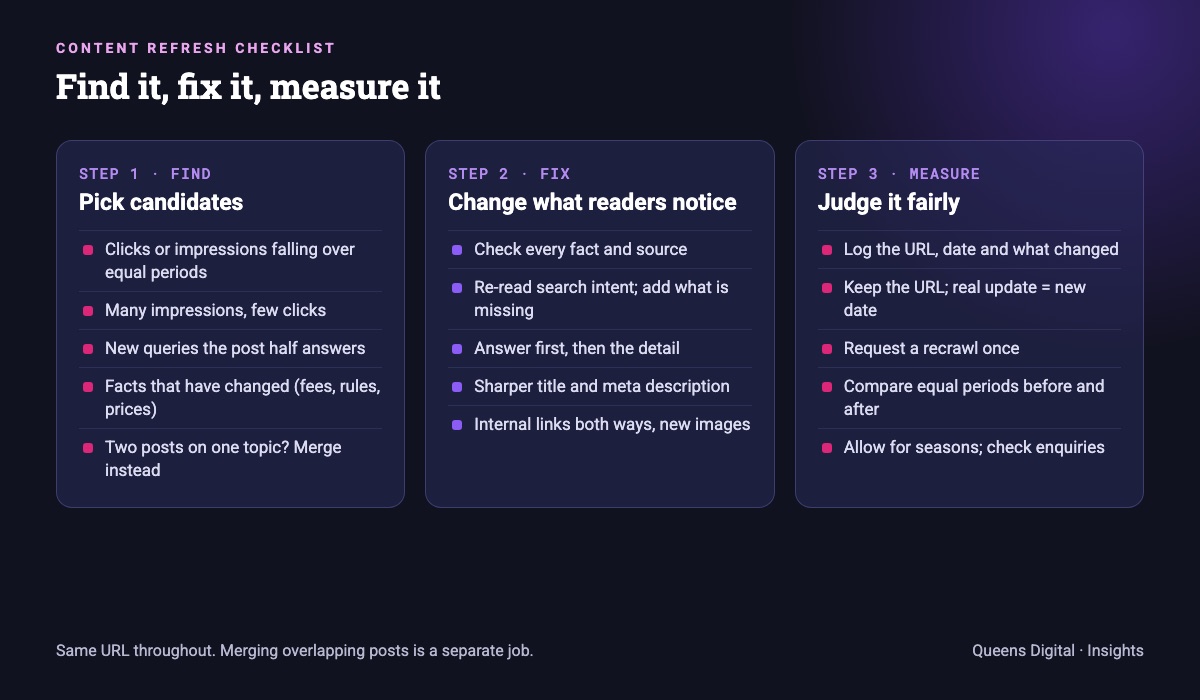
In our practice we pick refresh candidates from Search Console rather than from the publish date. Age alone is not a reason to update; a five-year-old post on a stable topic can be fine. The signals we look for:
- Falling clicks or impressions on a page that used to perform, compared over equal periods in the Search Console Performance report. This slow decline is often called content decay.
- Plenty of impressions but few clicks. The page is being shown but the title or snippet is not persuading people, or the page sits just below the top results.
- Queries the post was never written for. Filter the report by the page and read the queries. If people find it for a related question it only half answers, that is a section to add.
- Facts that have changed. Common examples: fees and intake dates, visa and work-rights rules, prices, tax and regulatory changes, or screenshots of tools that have since been redesigned.
- Posts that matter to the business, such as guides that lead readers to a service page, even if traffic is modest.
If you find two posts fighting for the same query while you do this, that is a merge, not a refresh. A keyword-to-URL map makes these clashes easy to spot before you start writing.
What to change when you update an old blog post
A good refresh changes what a reader would notice. Our working checklist:
- Check every fact, figure and date. Replace anything out of date, and add or update the source for it.
- Re-read the search intent. Search the main query yourself and look at what the top results now cover. Add what is missing; cut what no longer helps.
- Answer the new queries you found in Search Console, as new sections or FAQs where they fit.
- Put the answer first. A short, direct answer near the top helps readers, and it is the kind of passage AI tools can quote.
- Rewrite the title and meta description if click-through is weak. Google’s title link guidance asks for titles that are descriptive and concise, and it may rewrite ones that are not.
- Update internal links both ways: link out to newer related pages, and link to the refreshed post from newer posts.
- Replace broken links, old screenshots and images, with fresh alt text.
- Update the author and reviewer details if they have changed.
What not to do: pad the post with extra words, swap in more keywords, or tweak a sentence and call it updated. Google’s helpful content guidance also warns against adding or removing large amounts of content mainly to make a site seem “fresh”. Longer is not better; more accurate and more complete is. Often the best refresh cuts an out-of-date section as well as adding a new one.
For larger updates we write a short refresh brief first, in the same format as our SEO content brief example, so the writer knows which sections to keep, change and add.
Dates, URLs and asking Google to recrawl
Three technical points decide whether a refresh is seen as an update rather than a new page.
- Keep the URL. The existing URL carries the links and history. Change it only if it is genuinely misleading, and then use a permanent redirect from the old one.
- Change the date only for a real update. Google’s helpful content guidance lists changing the date to make a page seem fresh, when the content has not substantially changed, as a warning sign. When you have updated it properly, Google’s byline date guidance recommends a visible, clearly labelled date (such as “Last updated”) and a matching
dateModifiedin the Article or BlogPosting structured data. - Ask for a recrawl once. Use URL Inspection in Search Console, or keep the page in your sitemap with an updated
lastmod. Google’s recrawl documentation says crawling can take from a few days to a few weeks, that a request does not guarantee inclusion, and that requesting it repeatedly does not make it faster.
How to measure a content refresh
Most refreshes are judged too early or against the wrong period. This is how we measure them:
- Log the change. Note the URL, the date the update went live and what changed. Without a date you cannot compare.
- Wait. Give it at least a few weeks after Google has recrawled the page before you judge it.
- Compare equal periods. In the Performance report, filter by the page and compare, for example, 28 days after the update with the 28 days before. The report shows clicks, impressions, average CTR and average position.
- Watch for seasonality. Admission intakes, holiday seasons, tax deadlines and weather all move demand. If a page is seasonal, compare with the same period last year as well.
- Look at queries, not just totals. The best sign of success is the page gaining clicks for the questions you added.
- Check the business result. Enquiries, calls or clicks to the related service page matter more than traffic alone.
If a refresh made no difference after two or three months, look again: the problem may be intent, competition or a merge you have not done yet.
Content refreshes in practice
Content libraries that stay useful are maintained, not just added to. As a local example, our Kathmandu Model College case study describes a content programme running since 2021, with annual content plans and regular performance reviews, covering programmes, semester syllabi, fees and career scope. Those are exactly the topics that change from one intake to the next, so the existing guides need checking as well as new ones written.
Want a second opinion on your site? Ask us for a free SEO review and we will tell you what to fix first, in plain language.
Explore More
Reviewed by
K.K. Bhatta
K.K. Bhatta is a general digital marketer at Queens Digital Agency: hands-on across SEO, paid media, and whatever platform changes next. A lifelong learner rather than a one-topic specialist, he tests ideas on live campaigns before writing about them, and stays skeptical of anything that has not actually been tried.
Every claim in this article was checked against a live source before publishing.
There is no fixed schedule. Review your important posts at least once a year, and update a post as soon as its facts change or Search Console shows it losing clicks. Posts on stable topics may need nothing.
Not on its own. Google’s guidance treats changing dates without substantial changes as a warning sign. Update the date when you have genuinely updated the content.
A refresh keeps the structure and updates facts, sections, titles and links. A rewrite rebuilds the post because it no longer matches what searchers want. Both keep the same URL.
Usually not. The existing URL carries its links and history. If you must change it, add a permanent redirect from the old URL.
Google says crawling can take from a few days to a few weeks. Allow a few weeks after recrawl, then compare equal periods before and after the update.
Sources and references
Facts in this guide come from the sources below, checked live on 8 November 2026. Everything else is our own working practice, stated as such.