Quick answer
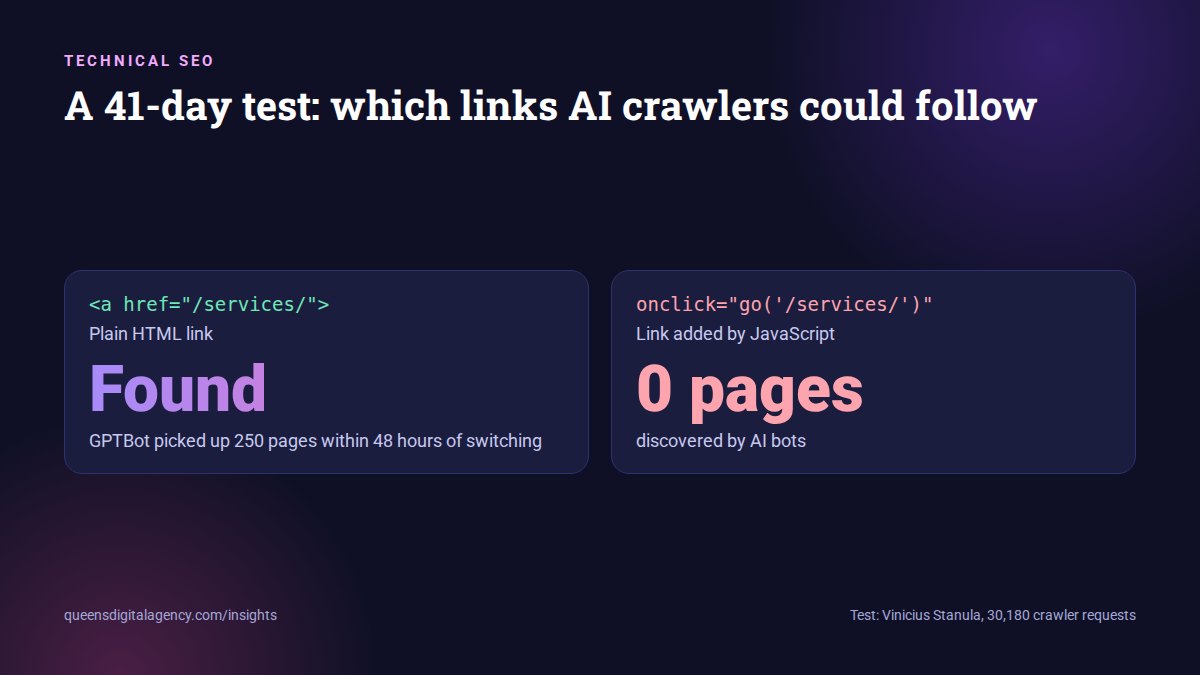
Many AI crawlers do not run JavaScript, so they cannot follow links that only appear after a script runs. In a 41-day test by SEO engineer Vinicius Stanula, AI bots including GPTBot, ClaudeBot and PerplexityBot discovered zero pages linked only through JavaScript. After switching those links to plain HTML, GPTBot found 250 new pages within 48 hours. Google says it can only crawl a link that is an a element with an href attribute, so use standard HTML links for every page you want found.
Key takeaways
- AI crawlers found zero JavaScript-only linked pages in a 41-day, 30,180-request test.
- Switching to plain HTML links let GPTBot find 250 new pages in 48 hours.
- Google says it can only crawl links that are a elements with an href attribute.
- Custom menus, filters, load-more buttons and headless builds are the usual culprits. Standard WordPress themes are usually fine.
- Check the page source, not the rendered page, to see what crawlers see.
Picture a shop with a beautiful front door and a back room full of stock. The only way into the back room is a door that opens when you say a password.
Your customers know the password. Some visitors do not.
That is roughly how JavaScript-only links work for many AI crawlers. A person in a browser clicks a menu and the page loads. A crawler that does not run JavaScript sees no link at all.
So those pages exist for your customers but not for the tools that increasingly answer your customers’ questions.
What running JavaScript means
A web page arrives as HTML, the basic text and structure. JavaScript is code that runs afterwards in the browser to add menus, filters, pop-ups and interactive features.
If a link is written into the HTML, any crawler can see it. If JavaScript creates the link after the page loads, only a crawler that runs JavaScript will see it.
What did the 41-day test find?
SEO engineer Vinicius Stanula ran a controlled test, written up on DEV Community.
The setup
- A test site of about 1,000 pages across 21 categories.
- Eleven categories linked with normal HTML links.
- Ten categories linked only through JavaScript, missing from the initial HTML.
- 41 days of server logs: 30,180 requests from 27 different crawlers, including GPTBot, ClaudeBot, PerplexityBot, Googlebot, GoogleOther and Bingbot.
The results
- AI bots discovered zero of the JavaScript-only pages.
- Google did discover JavaScript-linked pages, but its coverage fell off deeper in the site.
- When the links were switched to plain HTML, GPTBot found 250 new pages within 48 hours. Bingbot added 89.
If an internal link is added only after a browser executes a script, a non-rendering crawler has no route to follow.
 Vinicius Stanula, via DEV Community
Does Google have the same problem?
Less so, but not zero.
Google can run JavaScript. Its JavaScript SEO documentation explains that Google crawls a page, queues it for rendering in a headless Chrome browser, and then indexes what it sees. A page can wait in that queue for seconds or longer.
Google is also clear about links:
Google can only crawl your link if it’s an
<a>HTML element with anhrefattribute.
 Google Search Central, Make your links crawlable
Google lists links it cannot reliably follow, including a span with an href, an a tag with only an onclick event, and framework-specific attributes like routerLink.
How Googlebot handles links on JavaScript sites, from Google’s own JavaScript SEO video series.
So HTML links help Google too. For many AI crawlers they are essential.
Why don't AI crawlers run JavaScript?
Running JavaScript is expensive. It takes far more computing power than reading plain HTML, and AI companies crawl a lot of pages.
An analysis by Vercel found that ChatGPT’s and Claude’s crawlers do fetch JavaScript files, in about 11.5% and 23.8% of requests respectively, but do not execute them.
ChatGPT and Claude don’t execute JavaScript, so any important content should be server-rendered.
 Vercel, The rise of the AI crawler
Google’s own documentation makes the same point in general terms, noting that server-side or pre-rendering is still a great idea because not all bots can run JavaScript. Google’s guide to optimising for generative AI also lists clear technical structure and proper HTML among its core recommendations.
Crawlers may get better at this over time. Planning your website around that hope is a gamble you do not need to take.
Which websites are most at risk?
Higher risk
- Sites built with JavaScript frameworks that render everything in the browser.
- Menus that open on click and load their links through a script.
- Product, course or property filters that change the page without creating real URLs.
- “Load more” buttons with no paginated links behind them.
- Buttons styled as links that use onclick instead of an href.
Usually fine
- Standard WordPress themes, where menus and content links are output in the HTML.
- Static or server-rendered sites.
Custom-built and headless sites need the most care. Our headless development team builds with server rendering for this reason, and our WordPress website design work keeps key navigation in plain HTML.
How do you check your own website?
It takes about two minutes per page, and no tools beyond your browser.
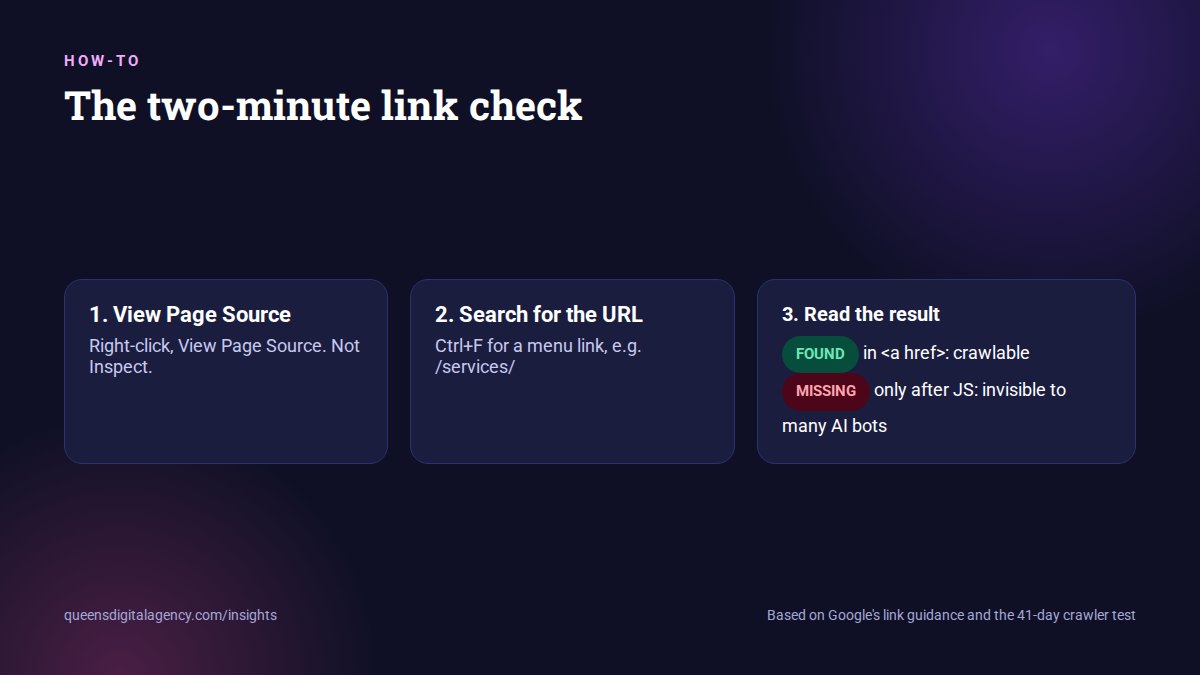
- Open an important page, such as your homepage or a service page.
- Right-click and choose View Page Source. Do not use Inspect, which shows the page after JavaScript has run.
- Press Ctrl+F and search for the URL of a page you link to from your menu, for example /services/.
- If the URL appears inside an a tag with an href, crawlers can follow it.
- If it does not appear at all, that link only exists after JavaScript runs.
- Repeat for your main navigation, category pages, filters and footer.
For a whole-site view, run a crawling tool with JavaScript rendering switched off, then again with it on. Pages found only in the second crawl are the ones AI crawlers are likely missing.
What good and bad links look like in the source
This is a link every crawler can follow:
<a href="/services/seo/">SEO services</a>These are links many crawlers cannot follow, because there is no real URL in an href:
<span onclick="go('/services/seo/')">SEO services</span>
<a onclick="openPage('seo')">SEO services</a>
Your developer can usually keep the same design and behaviour while switching to the first pattern.
How do you fix JavaScript-only links?
The fix is usually smaller than people fear.
1. Use real links for navigation
Every navigation item should be an a tag with an href to a real URL, even if JavaScript adds animation or behaviour on top.
2. Render important pages on the server
Server-side rendering or pre-rendering means the HTML already contains the content and links before any script runs.
3. Give important filters their own URLs
If a filtered view matters for search, such as a course category or a product type, it needs a crawlable URL and a link to it.
4. Back up load-more buttons with pagination
Add normal paginated links behind infinite scroll or load-more buttons.
5. Keep an HTML sitemap page
A simple page linking to your important sections is a useful safety net. Our technical SEO services map exactly which links need changing and in what order.
How different crawlers handle links
| Link type | Googlebot | Typical AI crawlers |
|---|---|---|
| Plain a tag with href | Followed | Followed |
| Link injected by JavaScript | Often found, weaker deep in the site | Not found in the 41-day test |
| a tag with onclick only, no href | Not reliably followed | Not found |
| span or div with a click handler | Not followed | Not found |
| Filter without its own URL | No separate page to index | No separate page to cite |
| Link only in the XML sitemap | Discovered, weaker signal | Varies by crawler |
Why does this matter more in 2026?
Because more people ask AI tools instead of searching, and those tools can only recommend what they can reach.
Since August, ChatGPT has been sending far more searches directly to named websites, as we covered in our Reddit citations field note. If its crawler cannot follow your links, it cannot find your service pages when it arrives.
We made the same point about firewalls in our Cloudflare field note. JavaScript links are the quieter version of that problem: nothing looks broken, pages just never get discovered.
Make sure OpenAI’s crawlers are allowed too. OpenAI recommends allowing OAI-SearchBot if you want to appear in ChatGPT search results.
Related: How to see which pages Google shows in AI Overviews
What is the one thing to remember?
If a link matters, put it in the HTML.
Let JavaScript make it look good. Do not let JavaScript be the only way to find it.
You can see how we plan site structure on real builds in our Sitasma Travels case study. If you want your own site checked, Queens Digital is a digital marketing agency in Nepal offering web design and development and SEO services in Nepal under one roof.
Explore More
Google can only crawl your link if it’s an <a> HTML element with an href attribute.
ChatGPT and Claude don’t execute JavaScript, so any important content should be server-rendered.
Reviewed by
K.K. Bhatta
K.K. Bhatta is a general digital marketer at Queens Digital Agency: hands-on across SEO, paid media, and whatever platform changes next. A lifelong learner rather than a one-topic specialist, he tests ideas on live campaigns before writing about them, and stays skeptical of anything that has not actually been tried.
Every claim in this article was checked against a live source before publishing.
Many cannot. In a 41-day test, AI crawlers including GPTBot, ClaudeBot and PerplexityBot discovered zero pages that were linked only through JavaScript.
Google can render JavaScript and often finds these links, but coverage can weaken deeper in a site. Google says it can only crawl links that are a elements with an href attribute.
Open View Page Source, not Inspect, and search for the linked URL. If it appears inside an a tag with an href, crawlers can follow it.
Usually not, because standard WordPress themes output links in HTML. Custom JavaScript menus, filters and headless builds need more checking.
Use real a tags with href for navigation, render important pages on the server, give important filters their own URLs and add pagination behind load-more buttons.
Sources and references
Every claim above comes from the sources below, verified live before use. Accessed 25 September 2026.
- DEV Community, “JavaScript Links Can Hide Content From AI Crawlers, a 41-Day Test Shows”
- Vercel, “The rise of the AI crawler”
- Google Search Central, Make your links crawlable
- Google Search Central, Understand JavaScript SEO basics
- Google Search Central, Optimizing for generative AI in Google Search
- Google Search Central, “Links & JavaScript” on YouTube
- OpenAI, Overview of OpenAI crawlers