
Quick answer
Shopify handles the SEO basics: an automatic sitemap, a sensible robots.txt and canonical tags. The Shopify-specific work is making collection grids link to the canonical /products/ URL, keeping the theme lean and removing leftover app code, outputting one accurate Product structured-data block, and planning redirects within Shopify’s fixed URL folders. Because checkout is blocked from crawling, explain payment and delivery options on indexable pages.
Key takeaways
- Shopify gives you a sitemap, robots.txt and canonicals; it does not choose what should rank.
- Collection grids often link to duplicate /collections/…/products/ URLs; point them at /products/.
- Uninstalling an app does not remove its code from the theme.
- Check for duplicate Product markup from the theme and apps.
- Checkout is not crawled: put payment and delivery details on indexable pages.
- Shopify redirects only work when the old URL no longer loads a page.
Is Shopify good for SEO? Hosting, security and checkout are handled for you, and the basics are right out of the box. That does not mean SEO is handled for you. Shopify’s fixed URL structure, theme code, apps and payment set-up create problems that WordPress stores do not have.
This Shopify SEO guide works as a checklist for the platform-specific part of the job: duplicate product URLs, theme speed and SEO apps, structured data, redirects, and what payments and checkout mean for search. It is one part of our SEO for online stores. For the page-level basics, such as category intros and product descriptions, read our category and product page guide first.
Is Shopify good for SEO?
Mostly, yes. Out of the box, Shopify gives you several things that would take plugins elsewhere:
- An automatic XML sitemap. Shopify’s sitemap documentation says every store generates a sitemap.xml at the root of the domain, linking products, collections, pages and blog posts, and updates it when you add content.
- A sensible robots.txt. Shopify describes its default file as optimal for SEO. It blocks admin, cart, checkout and account pages, and sorted collection URLs.
- Canonical tags. Shopify says its themes identify the canonical version of a page automatically.
- Editable titles, descriptions and alt text on every product, collection and page.
What Shopify does not do is decide which pages deserve to rank, write useful copy, keep the theme lean or keep your internal links clean. Those are the jobs below. If you are still choosing a platform or rebuilding a store, our Shopify store design and development team builds these fixes in from the start.
What Shopify does for you, and what you still own
| Area | Shopify by default | Your job |
|---|---|---|
| XML sitemap | Generated and updated automatically | Submit it in Search Console; keep junk pages out |
| robots.txt | Sensible default file | Edit only with care (robots.txt.liquid) |
| Canonical tags | Added by most themes | Make internal links match the canonical /products/ URL |
| Speed | Fast hosting and image CDN | Lean theme, few apps, leftover app code removed |
| Structured data | Often in the theme | One complete, accurate Product block per page |
| Payments | Shopify Payments in some countries; third-party and manual methods | Explain payment and delivery options on indexable pages |
Duplicate /collections/.../products/ URLs
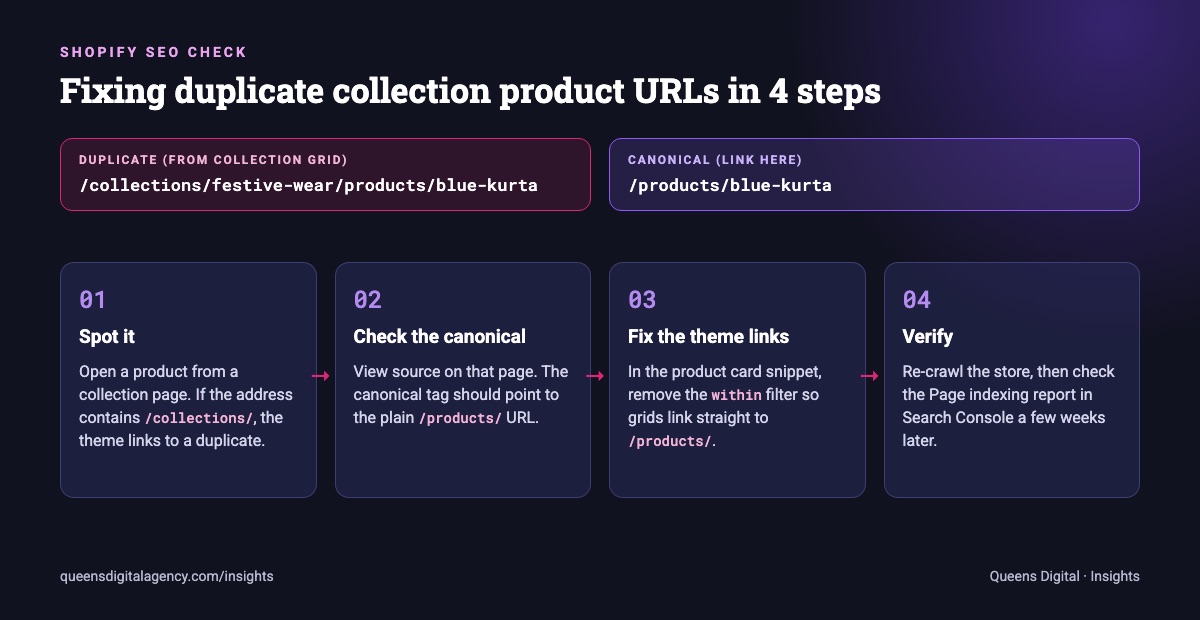
This is the best-known Shopify SEO issue. Every product has one main URL, /products/blue-kurta. But when a shopper opens that product from a collection grid, many themes link to a second address, /collections/festive-wear/products/blue-kurta. A product that sits in five collections can have six URLs showing the same page.
The cause is in the theme. Shopify’s developer documentation for the within filter explains that it builds a product URL inside the context of a collection, and warns developers to consider the SEO implications because the same content appears at two URLs.
The canonical tag on those collection-path pages normally points back to the /products/ URL, so Google usually indexes the right one. But Google treats a canonical as a strong hint, not a rule, and your own internal links are another signal. When hundreds of grid links point at the collection version, you are sending mixed signals and making Google crawl many copies of every product.
How we fix it:
- Open any product from a collection page and look at the address bar. If it contains
/collections/, the theme is linking to the duplicate. - View the page source and check that the canonical points to
/products/. - Edit the product card snippet so grid links use the plain product URL, removing the
withinfilter. - Re-crawl the store and check the Page indexing report in Search Console a few weeks later.
Collection filters and tags create a second family of duplicates. Shopify’s default robots.txt already keeps sorted URLs and some multi-filter combinations away from crawlers, but tag pages and single filters can still be crawled. Decide which ones deserve to rank; our guide to canonical, noindex and robots.txt explains which tool to use for the rest.
Theme speed and Shopify SEO apps
Shopify’s hosting is fast. Most slow Shopify stores we audit are slow because of what has been added on top. Shopify’s own advice on improving store speed is direct:
- Remove apps you do not need. Shopify warns that too many apps loading assets on the storefront slows it down.
- Clean up after uninstalling. Shopify notes that uninstalling an app does not automatically remove its code from your theme. Old review widgets, pop-ups and tracking snippets often keep loading for months.
- Size images for where they appear. Shopify’s image CDN helps, but a 4,000-pixel photo in a 400-pixel product card is still wasted data.
- Use an up-to-date theme and limit the number of sections on each template. Shopify recommends its free Online Store 2.0 and Horizon themes as built for performance.
- Audit tags and scripts. For poor responsiveness (INP), Shopify points to excess JavaScript from the theme, apps or the tag manager.
Shopify’s web performance dashboard reports loading, interactivity and visual stability from real visitors. Check it on mobile first: many shoppers browse on phones over mobile data, where every extra script costs more than it does on office Wi-Fi.
Our rule of thumb: before installing an app, ask whether it adds sales or only adds features. Many SEO apps duplicate what Shopify already does.
Structured data on Shopify
Structured data helps Google show price, stock and ratings beside your products. On Shopify it usually comes from three places at once: the theme, an SEO app and a reviews app. That is how stores end up with two or three conflicting Product blocks on one page.
- Check what your theme already outputs. Shopify’s structured_data filter turns a product into schema.org Product markup, or ProductGroup when it has variants, and an article into Article markup. Many recent themes use it.
- Run the Rich Results Test on a product page and count the Product items. You want one complete set.
- Fill the gaps rather than adding a second layer. Google’s Product structured data guidance covers price, availability and reviews. If the theme misses something, extend the theme markup or replace it with a single app, not both.
- Keep it truthful. Price and stock in the markup must match the page. Use the same currency the page shows.
Payments, checkout and what buyers need to see
Payment set-up varies by country more than most Shopify guides admit, and it affects how you write product and help pages.
- Shopify Payments is only available in some countries. Check Shopify’s list of supported countries; Shopify says merchants elsewhere need a third-party payment provider.
- Third-party gateways carry extra fees. Shopify’s page on third-party payment providers says a transaction fee applies to orders processed through them. The providers you can choose depend on your store’s country, so check the Payments page in your admin, and confirm any local wallet integration with the wallet company itself.
- Cash on delivery is a manual payment method. Shopify’s manual payments guide lists COD and bank transfers as common manual methods. Orders stay unpaid until you record the payment, and Shopify does not charge third-party transaction fees on them.
What this means for SEO: checkout pages are blocked from crawling by default, so the information buyers look for before paying has to live on pages Google can see. In our practice the stores that convert best state payment and delivery options plainly on product pages and on one indexable delivery and payment page: accepted methods, delivery times and costs by region, and return rules. One local example: Shopify Payments is not offered in Nepal, so stores there rely on cash on delivery and third-party providers, and the ones that spell out COD areas and delivery times inside and outside the Kathmandu Valley answer the questions buyers ask before trusting a new store.
Handles, redirects and migrations
Shopify URLs follow fixed patterns: /products/, /collections/, /pages/ and /blogs/. You can change the handle (the last part) but not the folder. Plan this before a migration, because your old URLs will not map one to one.
Shopify’s URL redirect documentation sets the limits:
- A redirect only works if the old URL no longer loads a page. If it still returns a page, the redirect is ignored.
- You cannot redirect fixed paths such as
/productsand/collections, or collection tag-filter URLs. - Redirects can be imported in bulk from a CSV file, which is how we handle migrations from WooCommerce or a custom site.
When you rename a product, check that a redirect from the old handle exists. When you move a whole store to Shopify, follow a full migration checklist: crawl the old site, map every URL, redirect in one hop and keep the old sitemap for a while.
Shopify’s SEO fields guide recommends titles of 60 characters or fewer and descriptions of around 160. Write them for each collection and your best sellers by hand; the default is often just the product name.
Ecommerce SEO in practice
Our Clean Air Nepal case study shows store SEO for an official Blueair dealer: optimised homepage, product and filter pages, product listings on shopping surfaces and buying guides, so buyers searching for a purifier or a replacement filter find the official store before the pollution season. Queens Digital, a Nepal-based SEO and AI/GEO agency, runs the same Shopify checks for stores worldwide.
Want a second opinion on your site? Ask us for a free SEO review and we will tell you what to fix first, in plain language.
Explore More
Reviewed by
K.K. Bhatta
K.K. Bhatta is a general digital marketer at Queens Digital Agency: hands-on across SEO, paid media, and whatever platform changes next. A lifelong learner rather than a one-topic specialist, he tests ideas on live campaigns before writing about them, and stays skeptical of anything that has not actually been tried.
Every claim in this article was checked against a live source before publishing.
Yes, for most stores. It handles sitemaps, robots.txt, canonicals and hosting well. Rankings still depend on your content, internal links, speed and structured data.
A list of the platform-specific checks: canonical product links in collection grids, filter and tag pages, theme speed and leftover app code, one accurate Product markup block, redirects for changed handles, and unique titles and descriptions.
Not always. Many SEO apps repeat what Shopify and your theme already do and add scripts. Install one only for a gap you have confirmed, such as missing structured data.
You cannot remove the folder, but you can make collection grids link to the plain /products/ URL by editing the theme’s product card code.
Not directly. But buyers search for payment and delivery options before they trust a new store, so state them clearly on pages Google can index.
Sources and references
Facts in this guide come from the sources below, checked live on 8 November 2026. Everything else is our own working practice, stated as such.
- Shopify Help Center, Finding and submitting your sitemap
- Shopify Help Center, Editing robots.txt.liquid
- Shopify, Duplicate content: what it is and how to fix it
- Shopify Dev Docs, Liquid filter: within
- Shopify Dev Docs, Liquid filter: structured_data
- Shopify Help Center, Online store speed
- Shopify Help Center, Improving your online store performance
- Shopify Help Center, Shopify Payments supported countries
- Shopify Help Center, Third-party payment providers
- Shopify Help Center, Manual payment methods
- Shopify Help Center, URL redirects
- Shopify Help Center, Adding keywords to improve SEO
- Google Search Central, Consolidate duplicate URLs
- Google Search Central, Product structured data