
Quick answer
Search Console’s Generative AI performance report shows how many times links to your site appeared in Google’s AI Overviews and AI Mode, plus generative AI features in Discover. Since 31 August 2026 it has been available to all websites worldwide, as long as a site has enough AI impressions. It reports impressions only: no clicks, no average position and no queries. You can break the data down by page, country, device, date and search type, and compare it with your normal Performance report to see where AI visibility is growing.
Key takeaways
- The report covers AI Overviews, AI Mode and generative AI features in Discover.
- It shows impressions only. There are no clicks, positions or queries.
- The most useful views are by page and by country, compared against your normal Performance report.
- A separate setting lets sites opt out of Google’s AI features. Most businesses should leave it on.
- Pair it with a monthly ChatGPT prompt check, because Google is only one AI surface.
For a long time one question had no official answer: how often does Google show my website inside its AI answers?
On 3 June 2026, Google announced Search Generative AI performance reports in Search Console. Access widened on 23 June, and according to Search Console Help, the insights reached all websites worldwide by 31 August.
What it covers
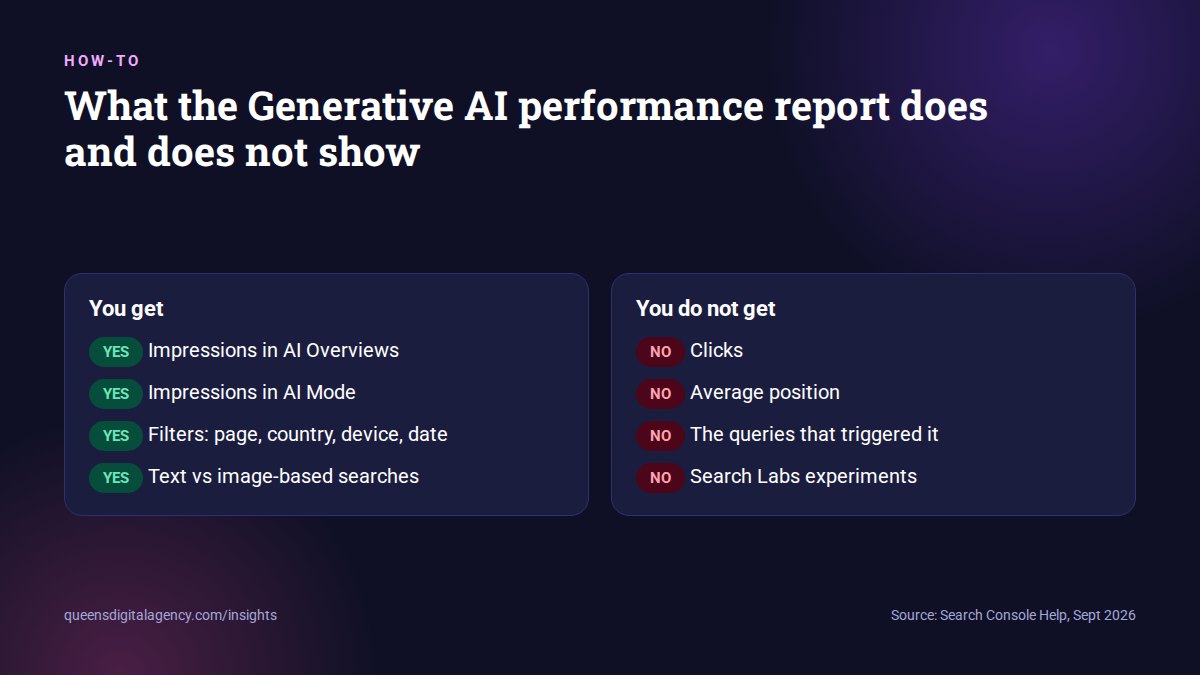
- AI Overviews: the AI summaries shown above normal search results.
- AI Mode: Google’s separate, conversational AI search experience.
- Generative AI features in Discover: included according to Search Engine Journal.
It is the first first-party measure of AI visibility on Google. That alone makes it worth ten minutes a month.
The SEO community noticed the gaps straight away. International SEO consultant Aleyda Solis welcomed the report on launch day, while pointing out that it shows no prompts, topics or clicks.
Aleyda Solis on the new report, 3 June 2026. View the post on X.
Where do you find the report in Search Console?
Google has placed the new data inside the performance reports you already know.
- Open Search Console and select your property.
- Go to the Performance section and open the Search results report.
- Look for the Generative AI tab. SEO Hacker describes a Generative AI tab in both the Search results and Discover reports.
- Set your date range. Hourly, daily, weekly and monthly views are available.
- Use the tabs below the chart to switch between pages, countries, devices and search type.
If you cannot see it
There are two common reasons.
First, your site may not have enough AI impressions yet. Google only shows the report when there is sufficient data. For many smaller business websites this is the most likely explanation, and it is useful information in itself.
Second, your site may be excluded from AI features, for example through the new generative AI setting or through snippet restrictions on your pages.
Search Engine Journal also noted that some properties still lacked access after the global announcement, so check again in a few weeks.
What does the report actually measure?
Impressions. That is the key word.
How many times links to your site were shown to a user in a generative AI feature.
 Search Console Help, definition of an impression in this report
So each time an AI Overview or AI Mode answer shows a link to one of your pages, that counts as an impression.
The ways you can slice it
- Pages: grouped by canonical URL after redirects, so duplicates are combined.
- Countries: where the search came from.
- Devices: desktop, tablet or mobile.
- Dates: in Pacific time, which matters when you compare with other tools set to Nepal time.
- Search type: normal text searches or image-based, multimodal searches.
According to PinMeTo, the same impressions also remain inside your overall performance data. The new report simply isolates them.
What does the report leave out?
This is where most people misread it.
- No clicks. You cannot see how many people clicked through from the AI answer.
- No CTR or average position. You cannot see where in the answer your link appeared.
- No queries. You cannot see which searches triggered the AI answer.
- No Search Labs experiments. These are excluded.
Other things to know
- Tables are limited to 1,000 rows.
- Chart and table totals can differ, because data is grouped differently at property and page level.
- The most recent days are preliminary and can change.
- A logging error affected Generative AI impressions from 13 to 17 August 2026, as Digital Applied reported, so avoid that week in any comparison.
Impressions without clicks tell you where you’re being seen, not what that visibility is worth.
Sean Si, SEO Hacker
How should you read the numbers?
Treat the report as a map of where Google already trusts you. Then use it to decide where to work next.
Start with your top pages
Sort by impressions and look at your top ten pages. For each one, ask a simple question: is this the page I would want Google to quote?
Often the answer is surprising. A three-year-old blog post may be doing the heavy lifting while your main service page barely appears.
Compare with the normal Performance report
SEO Hacker suggests pulling your regular search data for the same dates and comparing total impressions with AI impressions. If the AI share keeps growing for a page, more of that page’s visibility is happening inside AI answers.
Check by country
If you serve more than one market, the country view shows where AI features use your pages. A study abroad consultancy, for example, might find its Australia pages appear in AI answers in Nepal but its Canada pages do not.
Related: The complete SEO guide for study abroad consultancies
Fix what Google is quoting
If a weak or outdated page is getting the impressions, improve it first. Freshness and clear, direct answers matter a great deal for AI features, as we explained in the 20% of SEO that gets you cited by AI.
How do you estimate the value of AI impressions?
Indirectly. There is no perfect method yet, but you can get close enough to make decisions.
Why clicks behave differently
When an AI summary appears, people click less. Pew Research Center found users clicked a traditional result on 8% of visits with an AI summary, compared with 15% without one. Ahrefs reported in 2026 that AI Overviews reduced clicks to top-ranking content by 58%.
So a page can gain AI impressions and still lose clicks. That is not automatically bad. People may see your brand, remember it and search for you later.
Three signals worth combining
- AI impressions for a page, from the new report.
- Clicks and impressions for the same page, from the normal Performance report.
- Business results for that page: enquiries, calls or bookings from Google Analytics or your CRM.
If AI impressions rise while clicks stay flat, the AI answer may be satisfying simple questions. If AI impressions and enquiries rise together, the page is being cited for questions where people still want to talk to you. That is the page to invest in.
Related: How to track your brand in ChatGPT answers, from our Reddit field note
What is the generative AI control, and should you use it?
Alongside the reports, Google rolled out a setting that lets a site opt out of its AI features. Search Engine Journal describes it as a property-level setting in Search Console’s Settings.
Sites that opt out will not receive traffic or impressions from our generative AI features.
Google, via Search Engine Land
Google says opting out does not affect rankings in regular web results. For now the setting applies to the whole property. Search Engine Journal reported that page-level controls are expected by March 2027.
Our advice
For most businesses that want to be found, leave it on. Opting out mainly makes sense for publishers with specific licensing concerns.
It is also easy to switch off by accident and hard to notice later. Make sure only the person who manages your SEO changes it.
Generative AI report versus the standard Performance report
| Question you want answered | Generative AI report | Standard Performance report |
|---|---|---|
| How often am I shown in AI Overviews or AI Mode? | Yes, as impressions | No |
| How many clicks did I get? | No | Yes, all Search clicks |
| Where did I rank? | No | Yes, average position |
| Which queries triggered it? | No | Yes |
| Which pages and countries? | Yes | Yes |
| Discover AI features? | Yes | Discover has its own report |
What should you do with this report every month?
A short, repeatable routine beats a long one-off audit.
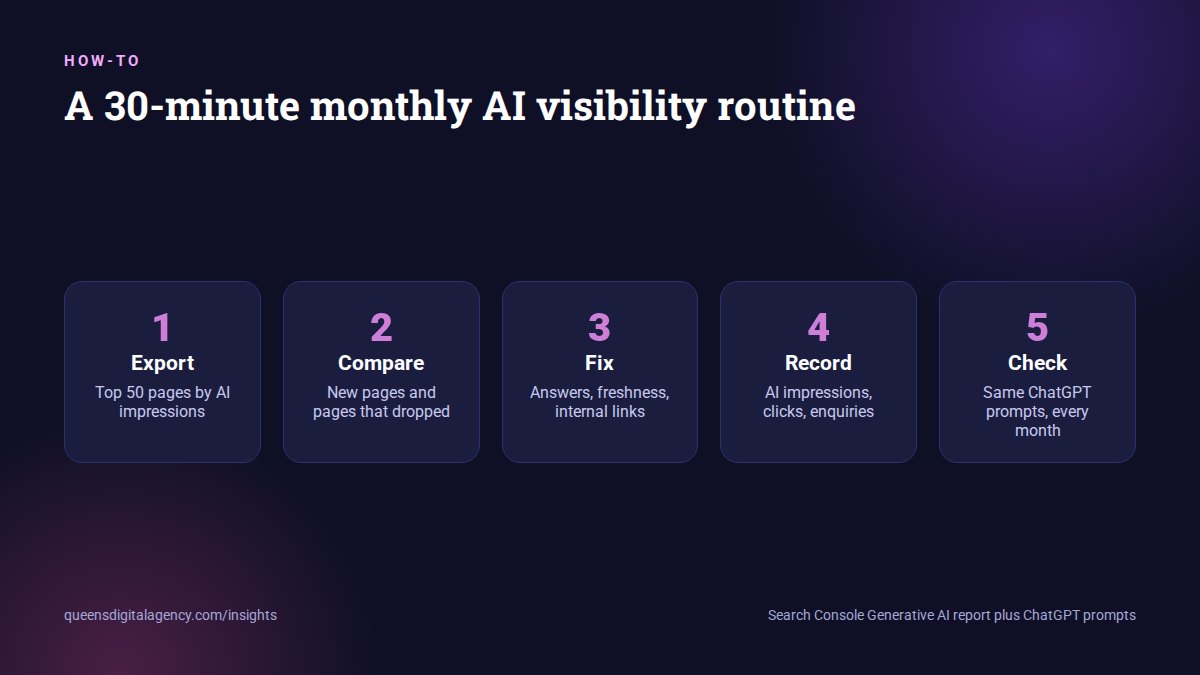
- Export the top 50 pages by AI impressions for the last full month.
- Compare them with the previous month. Note new pages and pages that dropped out.
- Check each top page is accurate, current and answers its main question in the first few lines.
- Find important service pages that never appear. Give them clearer answers and more internal links from related posts.
- Record totals next to your normal clicks and your enquiries in one sheet.
- Run your fixed set of ChatGPT prompts, because Google is only one AI surface.
For a clinic, a consultancy or a college, the same routine works. It is also the monthly reporting rhythm behind our AI SEO and GEO service. You can see the kind of AI visibility work it supports in our MIT Nepal case study.
What if your site has no report at all?
Then the job is simpler, not harder.
Make sure your site is indexed, crawlable and eligible to show snippets. Then publish clear answers to the questions your buyers ask.
Also check that nothing blocks Googlebot. Firewall and bot-protection settings can stop crawlers quietly. Our technical SEO service checks for exactly this.
Once Google starts using your pages in AI answers, the report will appear on its own.
If you would rather have someone set this up and read it with you, Queens Digital is a digital marketing agency in Nepal that includes AI visibility reporting in our SEO services in Nepal.
Explore More
As of August 31, 2026, we’ve rolled out these insights to all websites worldwide.
Impressions without clicks tell you where you’re being seen, not what that visibility is worth.
Reviewed by
K.K. Bhatta
K.K. Bhatta is a general digital marketer at Queens Digital Agency: hands-on across SEO, paid media, and whatever platform changes next. A lifelong learner rather than a one-topic specialist, he tests ideas on live campaigns before writing about them, and stays skeptical of anything that has not actually been tried.
Every claim in this article was checked against a live source before publishing.
No. It reports impressions only, meaning how many times links to your site were shown in AI Overviews, AI Mode or generative AI features in Discover. Clicks and average position are not included.
Inside the Performance section. Open the Search results report and look for the Generative AI tab. Discover has a similar tab.
Your site may not have enough impressions in Google’s AI features yet, or it may be excluded from them through the generative AI setting or snippet restrictions.
Not in this report. You can filter by page, country, device, date and search type, but not by query.
Google says the setting does not affect rankings in regular web results. Sites that opt out will not get impressions or traffic from its AI features.
Sources and references
Every claim above comes from the sources below, verified live before use. Accessed 25 September 2026.
- Search Console Help, Generative AI performance report (Search)
- Google Search Central Blog, “Introducing Search Generative AI performance reports in Search Console”
- Search Engine Land, AI performance reports and generative AI control rolling out globally
- Search Engine Journal, “Google Search Console AI Reports Rolled Out Worldwide”
- SEO Hacker, Search Generative AI performance reports in Search Console
- Aleyda Solis on X, 3 June 2026
- PinMeTo, Search Console adds Generative AI performance reports
- Digital Applied, August 2026 spam update measurement guide
- Pew Research Center, AI summaries and clicks
- Business Wire, Ahrefs Q1 2026 AI Search Benchmark Report