
Quick answer
Most business websites do not need llms.txt, agents.md or SKILL.md to appear in AI search. llms.txt is a proposed summary of a site for AI tools; agents.md tells AI agents how to use a service; SKILL.md packages instructions an AI agent can install. Shopify uses all three because AI agents can shop and set up stores through its platform. Google says Google Search does not use these files, and server-log studies show major AI crawlers rarely request llms.txt. If you add one, keep it accurate, and a sitemap entry is optional.
Key takeaways
- llms.txt summarises a site, agents.md instructs agents, SKILL.md teaches agents a task. They are not interchangeable.
- Shopify’s SKILL.md is an onboarding instruction for AI assistants, not a brand profile. Its brand summary lives in llms.txt and agents.md.
- Since May 2026, every Shopify store serves agents.md, with llms.txt mirroring it, and lists agents.md in a separate agent sitemap.
- Google says Google Search does not use these files. In a 12-week study, GPTBot fetched llms.txt 7 times and ClaudeBot 9 times across 83 sites.
- On WordPress, Yoast can generate llms.txt, and two Yoast filters let you add these files to your sitemap. Keep them up to date or they do harm.
Look at Shopify’s own sitemap and something unusual appears near the top. Right after the homepage, before the About page, is a Markdown file.
<url>
  <loc>https://www.shopify.com</loc>
  <priority>1.0</priority>
</url>
<url>
  <loc>https://www.shopify.com/SKILL.md</loc>
  <priority>0.8</priority>
</url>
That is an excerpt from shopify.com/sitemap.xml as we saw it on 25 September 2026. Shopify also serves /llms.txt and /agents.md on its main site, with almost identical content. The last line of each even names the internal bot that maintains it.
On every Shopify store too
Shopify’s developer changelog for 28 May 2026 confirms the store-level change:
Your store includes a default agents.md file accessible at /agents.md. The paths /llms.txt and /llms-full.txt also point to this content by default.
Shopify developer changelog, 28 May 2026
Merchants can customise each file with theme templates: agents.md.liquid, llms.txt.liquid and llms-full.txt.liquid. We checked a large Shopify store, Allbirds. Its main sitemap index now includes a separate agentic discovery sitemap that lists just one URL: /agents.md.
So yes, a big platform is putting Markdown files into sitemaps. The interesting question is why, and whether it matters for your business.
What are these three files, really?
They look similar because they are all Markdown. They do very different jobs.
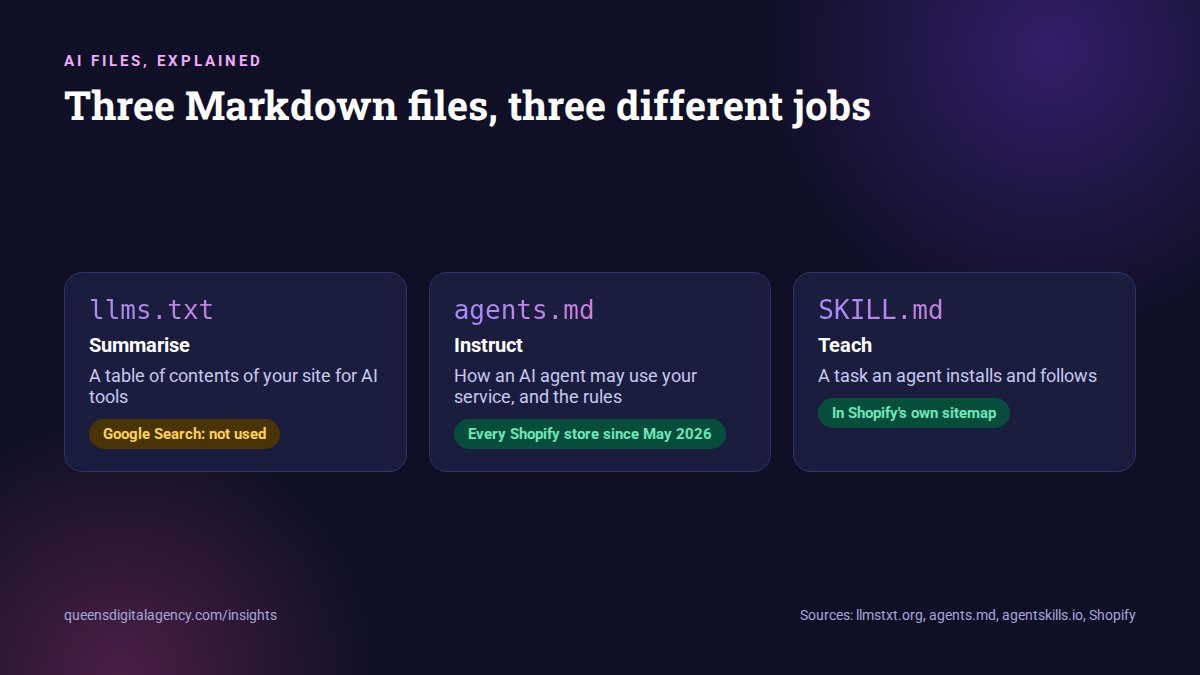
llms.txt: a summary of your website
llms.txt is a proposal from Jeremy Howard, first published in 2024. It is a Markdown file at the root of a site with a title, a short summary and lists of the most useful pages. Think of it as a table of contents written for AI tools.
agents.md: instructions for AI agents
AGENTS.md began as a format for coding agents working inside software projects, and it is now used by more than 60,000 open-source projects. In December 2025 it became one of the founding projects of the Linux Foundation’s Agentic AI Foundation, alongside the Model Context Protocol.
Shopify borrowed the name for websites. A store’s agents.md tells AI shopping agents how to search the catalogue, build a cart and check out, and sets rules such as requiring the buyer’s approval before payment.
SKILL.md: a skill an agent can install
Agent Skills is an open format originally developed by Anthropic. A skill is a folder containing a SKILL.md file with a name, a description and instructions for a specific task. Tools including Claude, ChatGPT and Codex, Gemini CLI, Cursor and GitHub Copilot support skills.
So what is Shopify’s SKILL.md?
It is not a brand profile. It is a short bootstrap that tells an AI assistant how to connect to Shopify’s official onboarding integration:
---
name: shopify-onboarding-merchant
description: Bootstrap the Shopify merchant onboarding skill
  for the current AI assistant.
maintainer: Shopify
---

# Shopify merchant onboarding

Use this page only to connect the current AI assistant to
Shopify's operational merchant onboarding skill...
The brand information, what Shopify is and its main pages, sits in llms.txt and agents.md. The SKILL.md is about getting an assistant to act.
Why are AI files suddenly everywhere?
Because AI tools are moving from answering questions to doing things.
From reading to acting
A year ago the conversation was about helping AI read your website. Shopify’s files are about helping AI agents act: find products, check out, set up a store. Allbirds’ agents.md points agents to Shopify’s commerce endpoints based on the Universal Commerce Protocol and says plainly:
Checkout requires human approval. Agents must not complete payment without explicit buyer consent.
Allbirds agents.md, generated by Shopify
Markdown instead of HTML
Markdown is also turning up in other ways. In February 2026, Cloudflare launched Markdown for Agents, which converts a page’s HTML to Markdown on the fly when an AI tool asks for it with an Accept: text/markdown header. One site owner who tracked 44 days of these requests found 1,421 of them, 35% from Anthropic’s Claude infrastructure.
Adoption is rising fast
According to data summarised by PPC Land from Originality.ai and Ahrefs, the number of llms.txt files grew 8.8 times between June 2025 and May 2026. Shopify alone added agent files to every store in one go.
The trend is real. The next question is whether anything reads these files.
Is there any proof that AI tools use these files?
Some, but much less than the hype suggests. Here is the evidence, for and against.
Google: Search does not use them
You don’t need to create new machine readable files, AI text files, markup, or Markdown to appear in Google Search (including its generative AI capabilities), as Google Search itself doesn’t use them.
 Google Search Central, Optimizing for generative AI in Google Search
Google’s John Mueller on llms.txt, June 2025. View the post on Bluesky.
Server logs: very few AI crawler requests
EZY.ai monitored 83 websites for 12 weeks between April and July 2026. Over that time, GPTBot fetched llms.txt 7 times, ClaudeBot 9 times and PerplexityBot not at all. Googlebot fetched it 67 times and Meta’s crawler 193 times.
The same crawlers that pulled robots.txt thousands of times pulled llms.txt in single digits.
EZY.ai, July 2026
At a larger scale, PPC Land reported that 97% of llms.txt files received zero requests in May 2026. Most requests that did happen came from SEO audit tools, not AI assistants.
Evidence on the other side
- AI tools do fetch Markdown when it is offered through content negotiation, as the Cloudflare tracking above shows.
- Meta’s crawler reads llms.txt far more than others.
- Agent Skills are used for real by ChatGPT, Claude and many coding tools, but only when a user or platform installs them, not by crawling random websites.
- Shopify’s agent commerce runs through its UCP and MCP endpoints. The agents.md file describes those endpoints; Craftshift found no public evidence that ChatGPT or Claude prioritise the file itself over normal pages.
The honest summary: the files are cheap, and a few systems read them, but no major AI search product has said it relies on them.
Which file should your business use?
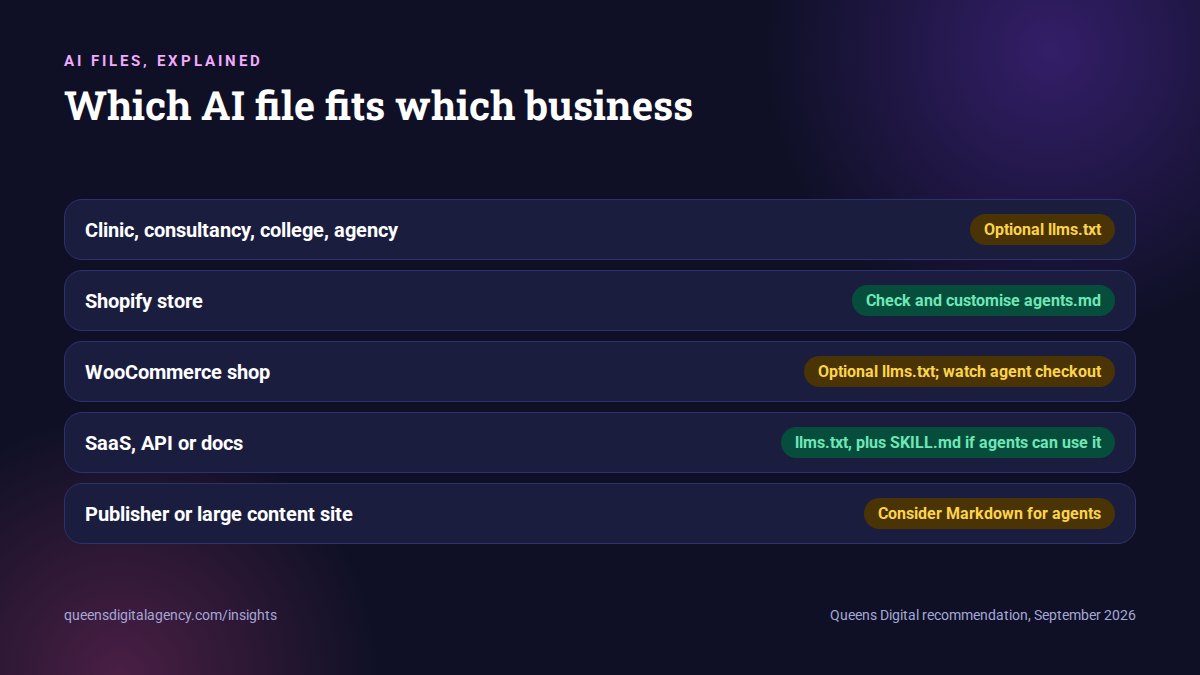
It depends entirely on what AI tools can do with your business. Here is an impartial guide by type.
Service businesses: clinics, consultancies, colleges, agencies
Nothing is required. An llms.txt is optional and low risk if it stays accurate. agents.md and SKILL.md add nothing unless AI agents can actually do something with you, such as book through a public booking system.
Shopify stores
You already have agents.md and llms.txt. The job is to check them and customise agents.md.liquid so your policies, shipping, returns and brand story are accurate.
WooCommerce and other online shops
Watch this space. An llms.txt pointing to categories, policies and top products is reasonable. Agent checkout on WooCommerce is still early, so do not build an agents.md that promises capabilities your store does not have.
Software, SaaS and API businesses
This is where these files pay off most. Clean Markdown documentation, an llms.txt index and, if agents can use your product, a SKILL.md that tells them how, all help developer tools that do read them.
Publishers and large content sites
Consider Markdown versions of pages or Cloudflare’s Markdown for Agents if AI agent traffic is significant to you. An llms.txt index is optional.
How do you add llms.txt or agents.md to a WordPress site?
There are three routes, from easiest to most flexible.
1. Let Yoast generate llms.txt
Yoast SEO has had an llms.txt generator since June 2025. You switch it on in Yoast’s settings. According to Yoast’s specification, it lists recent posts and pages and important categories, and is refreshed weekly by a scheduled task. You can also choose pages manually.
A warning from our own site
We checked the llms.txt on this website while writing this article. It was generated by an older Yoast version, and 9 of its 11 links pointed to old URLs that now redirect, including a post we had merged into another guide. An out-of-date file sends AI tools to the wrong pages, which is exactly the inconsistency you want to avoid. If you turn the feature on, check the file after every site restructure.
2. Upload a hand-written file
Write the file yourself and upload it to your site’s root folder by FTP or your host’s file manager, so it opens at yoursite.com/llms.txt or yoursite.com/agents.md. Keep it short and accurate:
# Example Dental Clinic

> Family dental clinic in Lalitpur offering check-ups, fillings,
> braces and teeth whitening. Open Sunday to Friday.

## Key pages

- [Services](https://example.com/services/): treatments and prices
- [Book an appointment](https://example.com/book/): online booking
- [Contact](https://example.com/contact/): address, map and phone
3. Generate it with code
A developer can generate the file from WordPress data so it never goes stale. That is the most reliable option for sites that change often, and it is how Shopify keeps its files current.
How do you add these files to your sitemap with Yoast?
Yoast does not add llms.txt or .md files to its sitemap by default. Two Yoast filters make it possible. We confirmed both exist in Yoast SEO 28.5.
Option A: a separate agent sitemap, the Shopify approach
This creates a small sitemap that lists only your agent files, then adds it to Yoast’s sitemap_index.xml using the wpseo_sitemap_index filter, which Yoast documents in its guide to adding an external sitemap. Add it to a small custom plugin or your child theme’s functions.php, then visit Settings, Permalinks and click Save once so the new address works. As with any code, test it on a staging copy of your site first.
// 1. Serve a small "agent files" sitemap at /agent-sitemap.xml
add_action( 'init', function () {
  add_rewrite_rule( '^agent-sitemap.xml$', 'index.php?qd_agent_sitemap=1', 'top' );
} );
add_filter( 'query_vars', function ( $vars ) { $vars[] = 'qd_agent_sitemap'; return $vars; } );
add_action( 'template_redirect', function () {
  if ( ! get_query_var( 'qd_agent_sitemap' ) ) return;
  header( 'Content-Type: application/xml; charset=UTF-8' );
  $files = array( '/llms.txt' );   // add '/agents.md' if you publish one
  echo '<?xml version="1.0" encoding="UTF-8"?>';
  echo '<urlset xmlns="http://www.sitemaps.org/schemas/sitemap/0.9">';
  foreach ( $files as $path ) {
    $mod = file_exists( ABSPATH . ltrim( $path, '/' ) ) ? gmdate( 'c', filemtime( ABSPATH . ltrim( $path, '/' ) ) ) : gmdate( 'c' );
    echo '<url><loc>' . esc_url( home_url( $path ) ) . '</loc><lastmod>' . $mod . '</lastmod></url>';
  }
  echo '</urlset>';
  exit;
} );

// 2. List it in Yoast's sitemap_index.xml
add_filter( 'wpseo_sitemap_index', function ( $xml ) {
  return $xml . '<sitemap><loc>' . esc_url( home_url( '/agent-sitemap.xml' ) ) . '</loc><lastmod>' . gmdate( 'c' ) . '</lastmod></sitemap>';
} );
Option B: add the file to your existing page sitemap
Simpler, with one line of logic. Yoast runs a wpseo_sitemap_page_content filter that appends extra URLs to page-sitemap.xml.
// Add /llms.txt to the end of Yoast's page-sitemap.xml
add_filter( 'wpseo_sitemap_page_content', function ( $xml ) {
  return $xml . '<url><loc>' . esc_url( home_url( '/llms.txt' ) ) . '</loc></url>';
} );
Things to check afterwards
- Open the file in your browser and confirm it loads with the right content.
- Open sitemap_index.xml and confirm the new entry appears. Clear any caching plugin first.
- Submit the sitemap again in Search Console.
- Remember that Google may index the file as a plain text page. That is harmless, but it is another reason to keep it accurate.
If this is more code than you want to maintain, our WordPress team can set it up and keep it in sync with your pages.
llms.txt, agents.md and SKILL.md compared
| llms.txt | agents.md | SKILL.md | |
|---|---|---|---|
| Purpose | Summary and index of a website | Instructions for agents using a service | A task an agent can install and follow |
| Origin | Jeremy Howard, 2024 | Coding-agent standard, Linux Foundation AAIF | Agent Skills, developed by Anthropic |
| Who reads it today | Few AI crawlers; SEO tools; some Meta crawling | Agents on platforms that support it, such as Shopify stores | Assistants and coding tools when installed |
| Used by Google Search? | No, according to Google | No | No |
| Best for | Docs, SaaS, large sites; optional elsewhere | Shopify stores and services agents can transact with | Products and APIs agents can operate |
| Main risk | Going stale and pointing to wrong pages | Promising capabilities you do not have | Low; only matters if agents install it |
Should you put .md or .txt files in your sitemap at all?
Here is the balanced view.
Reasons to do it
- It makes the files easy for any crawler to discover.
- It costs almost nothing once set up.
- It mirrors what a large platform, Shopify, has chosen to do.
Reasons not to bother
- Google says Google Search does not use these files, so the sitemap entry will not help your Google visibility.
- Major AI crawlers rarely request llms.txt even when it exists.
- A sitemap entry pointing to a stale file spreads the wrong information further.
Our view: if the file is accurate and maintained automatically, listing it is fine. If it is hand-written and nobody owns it, leave it out of the sitemap, or leave the file out altogether.
So, what does your website actually need?
For most businesses: a correct robots.txt, a clean sitemap of your real pages, crawlable HTML links and clear answers on the pages themselves. These are what search engines and AI tools demonstrably use.
- Check that robots.txt and your firewall allow Googlebot, Bingbot and OAI-SearchBot.
- Make sure important pages are linked with plain HTML links. See our JavaScript links field note.
- Put a direct answer near the top of each key page.
- Keep business facts identical everywhere.
- Only then, add an llms.txt or agents.md if it fits your business, and keep it accurate.
If you would like help deciding, Queens Digital is a digital marketing agency in Nepal. Crawl access, site structure and AI files are part of our technical SEO services and AI SEO and GEO services.
Explore More
You don’t need to create new machine readable files, AI text files, markup, or Markdown to appear in Google Search (including its generative AI capabilities), as Google Search itself doesn’t use them.
robots.txt is where AI access is actually decided today… llms.txt is cheap, standards-track insurance.
Reviewed by
K.K. Bhatta
K.K. Bhatta is a general digital marketer at Queens Digital Agency: hands-on across SEO, paid media, and whatever platform changes next. A lifelong learner rather than a one-topic specialist, he tests ideas on live campaigns before writing about them, and stays skeptical of anything that has not actually been tried.
Every claim in this article was checked against a live source before publishing.
llms.txt is a summary and index of a website for AI tools. agents.md gives AI agents instructions for using a service. SKILL.md packages a task an AI agent can install and follow.
Shopify’s SKILL.md is a short bootstrap that tells AI assistants how to connect to Shopify’s official merchant onboarding integration. It is about letting agents act, not about describing the brand.
No. Google says Google Search, including its AI features, does not use AI text files, markup or Markdown files like these.
Rarely, according to server logs. In a 12-week study of 83 sites, GPTBot fetched llms.txt 7 times and ClaudeBot 9 times, compared with thousands of robots.txt requests.
Use Yoast’s wpseo_sitemap_index filter to add a small separate sitemap listing the file, or the wpseo_sitemap_page_content filter to append it to your page sitemap. Only do it if the file is kept accurate.
Sources and references
Every claim above comes from the sources below, verified live before use. Accessed 25 September 2026.
- Shopify, sitemap.xml, checked 25 September 2026
- Shopify, SKILL.md
- Shopify, llms.txt
- Shopify developer changelog, “Customize /llms.txt, /llms-full.txt and /agents.md”, 28 May 2026
- Allbirds, agents.md
- Allbirds, agentic discovery sitemap
- llmstxt.org, the llms.txt proposal
- AGENTS.md
- Linux Foundation, Agentic AI Foundation announcement, 9 December 2025
- Agent Skills, overview
- Universal Commerce Protocol
- Google Search Central, Optimizing for generative AI in Google Search
- Google Search Central, AI features and your website
- John Mueller on Bluesky, 17 June 2025
- EZY.ai, “We Put llms.txt on 83 Websites. OpenAI Read It 7 Times.”
- PPC Land, “llms.txt adoption rises 8.8x but 97% of files get zero AI requests”
- Craftshift, Shopify native llms.txt and agentic discovery rollout
- Cloudflare changelog, Introducing Markdown for Agents, 12 February 2026
- Suganthan, “Cloudflare Markdown for Agents. I Tracked Every AI Request for 44 Days.”
- Yoast, llms.txt feature
- Yoast developer portal, llms.txt functional specification
- Yoast, How to add an external sitemap to the index
- OpenAI, Overview of OpenAI crawlers